Bookmarks vs Tab Manager: Use Each For What It's For
Toby Team
May 21st, 2026
9 min read
You have 800 bookmarks. You haven’t opened the folder structure since 2022. You know, somewhere in there, is the article you wanted to re-read, or the docs page you bookmarked during onboarding, or that one client’s brief. You also have 47 tabs open right now, half of which you’d like to set down somewhere.
You’ve probably done the search before: “bookmarks vs tab manager”, or “tab manager better than bookmarks”, or some variation. The posts you find all say roughly the same thing. “Bookmarks are for long-term saves, tab managers are for sessions. Use both together.” It’s not wrong, exactly. It’s just not the part you actually need.
The part you actually need is this: bookmarks weren’t built for the job most people are trying to use them for. Once you see that, the choice between bookmarks and a tab manager stops being a feature comparison and becomes a question about what your brain is doing.
The job your bookmarks were built for
Bookmarks are a retrieval tool. You name the page, you tuck it in a folder, you come back to it weeks or months later because you knew exactly what you were looking for. Your bank. Your company’s style guide. The Linear board. The timesheet URL you’d otherwise have to search for every two weeks.
For that job, bookmarks work. Browser bookmarks have been doing it competently since 1993. Browser sync ships in Chrome and Firefox now, the folder UI is fine for a list you barely touch, and you can search the bookmarks bar from the address bar if you need to. If your saved-links library is permanent reference material that you intentionally retrieve, you don’t need any of this post. Keep using bookmarks.
The trouble is that most people aren’t saving permanent reference material. They’re saving working memory.
The job most people are actually doing
Watch yourself for a week. The links you save are mostly project-shaped, not reference-shaped. The article you’re going to reread next Tuesday after the design review. The four product pages you’re comparing before deciding which monitor to buy. The seven tabs of research for a piece you’re writing. The Q3 planning docs.
These aren’t permanent reference. They’re temporary context. They have a beginning (when the project starts), a middle (when you’re actively in it), and an end (when it ships or gets canned). Saving that into bookmarks is like filing your half-written sticky notes in a filing cabinet. The medium isn’t the problem you think it is, the medium is asking you to do something you weren’t going to do anyway.
Three things tend to happen when you push working memory into bookmarks:
- You stop opening the folder. Bookmarks live in a menu that collapses by default. Out of sight is out of mind, especially when “out of sight” requires three clicks to reach.
- You lose recognition. A bookmark is a line of text. By the time you scroll down to it three weeks later, the original context (why you saved it, what project it belonged to, what tab was open next to it) is gone. You’re left with the title and the URL, and a sense that you should know what this is.
- The folder structure becomes its own problem. You start nesting. You promise yourself you’ll clean it up. You don’t. As Medium writer Adam Hughes put it in his post on this, bookmarks “scale linearly” (no folder system survives the volume).
Most “bookmark organization” advice doubles down on point three. Better folder names. Tagging plugins. Monthly cleanups. It’s an attempt to fix the symptom while leaving the cause in place. The cause is that you’ve put a project-shaped thing in a retrieval-shaped tool.
Retrieval vs recognition
Here’s the underlying split.
Retrieval is what bookmarks ask of you. You hold a query in your head (“the Stripe docs page I bookmarked in March”), you navigate to where you put it, you scan a list of titles, you find it. Your brain does the work. The tool just stores.
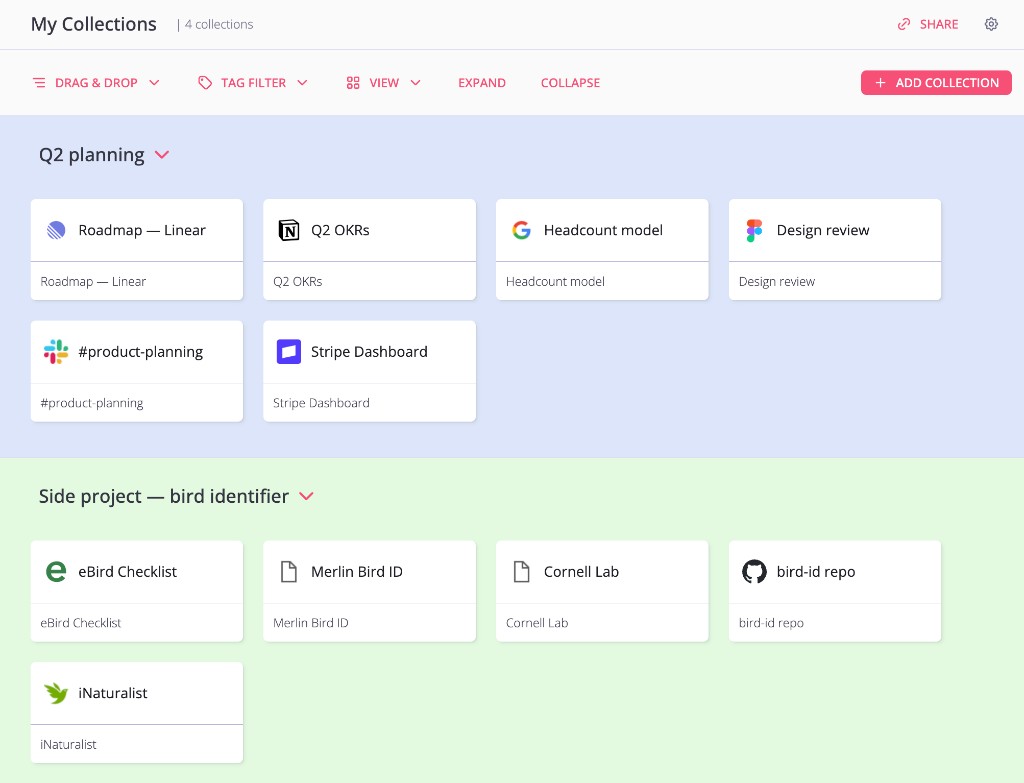
Recognition is the inverse. The tool shows you the saved work, and your brain matches it to what it was. You don’t navigate to your project, you see your project. Spatial memory does the lifting (this collection lives top-left, that one lives bottom-right). Visual cues do the rest (favicons, layout, names you can scan).
Retrieval is great when you know exactly what you want, ask anyone who used Google in 1999. Recognition is great when you have an in-flight project that already has a shape you’ll know on sight. Most working memory is the second kind.
Tab managers are built for the second kind. That’s the entire category. Not “smarter bookmarks”, not “bookmarks plus tags”, but a different cognitive surface for a different cognitive job. The reason people who try a tab manager don’t usually go back to bookmarks isn’t that the tab manager has more features. It’s that recognition is much, much easier than retrieval, and the difference compounds the more saved work you accumulate.
How Toby fits
Toby is a Chrome extension that turns your new tab page into the surface where your saved work lives. Open Chrome, see your collections, scan favicons, click into the one you want. The interaction we built the product around is Save Session: one click closes every tab in the current window and parks them in a named collection. Open Chrome tomorrow and that collection is sitting there, on the new tab page, exactly the way you left it.
If you’ve ever bookmarked all your open tabs (Ctrl+Shift+D in Chrome, the “Bookmark all tabs” command), you know what that interaction wants to be. The browser’s version drops 30 links into a generic folder named with today’s date. Toby’s version drops 30 cards onto a named board you’ll recognize at a glance.
The longer you use a tool like this, the more the line between “this is bookmark material” and “this is tab-manager material” sharpens. We wrote about that workflow shift in How Using a Tab Manager Can Change Your Workflow, and our Workona Alternative comparison covers what changes when you move beyond saving tabs as a flat URL list. The reframe is the same in all three pieces: the goal isn’t tidiness, it’s giving your working memory a place to sit that your brain will actually look at.
A few things we’re explicitly not. We’re not a permanent-reference bookmark manager. We’re not a read-later app. We’re not an AI-organize-it-for-you tool. If those are the jobs you need done, Raindrop and Chrome’s built-in Reading List are good. Some people use Raindrop for permanent reference and Toby for project context, side by side. The point of this post isn’t to declare a winner. It’s to help you stop putting the wrong thing in the wrong tool.
When bookmarks still win
To be specific, keep using bookmarks for:
- Sites you visit weekly or daily that aren’t in your address bar’s autocomplete (the internal HR portal, the 401k login, the staging dashboard).
- Permanent reference (style guides, API docs you re-read, your own company’s wiki).
- The handful of links you genuinely want to keep for years (a great essay, a recipe, a long talk you’ll rewatch).
Use a tab manager for:
- Tab groups for in-flight projects.
- Research sessions that span days or weeks.
- The “I’ll get back to this” pile that currently lives in 30 open tabs.
- Anything you’d want to see when you open the browser, not just remember to look for.
The two tools coexist without competing because they’re solving different problems. The mistake the SERP keeps making is presenting them as overlapping options. They aren’t. They’re complementary because they do different jobs.
How to migrate
You don’t have to migrate. The cheapest move is to start using a tab manager for new project-shaped work and leave the existing bookmark folder alone. After a month or two, you’ll notice that the new collections feel useful and the old bookmark folder feels like an archive. That’s the signal to either let the bookmark folder rest where it is (treat it as cold storage) or, if you want to, prune the items that were really project memory in disguise and move them into collections.
If you want a faster path:
- Install Toby (or any tab manager you trust). Free is fine for solo use.
- Open your bookmarks folder. Scan it for project-shaped clusters. You’ll spot them. They tend to be the folders titled “research”, “Q2 stuff”, “things to read”, or someone’s name.
- Move one cluster at a time into a Toby collection. Don’t try to do all 800 at once.
- Keep the rest as bookmarks. Permanent reference is exactly what they’re for.
That’s it. No declared bankruptcy, no afternoon of organization.
FAQ
Is a tab manager just a fancy bookmarks folder?
No. They look similar from the outside (both store URLs) but they solve different cognitive jobs. Bookmarks are built for retrieval, where you know what you want and go fetch it. Tab managers are built for recognition, where the tool shows you what you saved and your brain matches it to the project it belongs to. The volume of saved items at which recognition starts beating retrieval is somewhere around 20 to 50 items.
Should I just use Chrome tab groups instead of a tab manager?
For active, in-session organization, Chrome’s native tab groups work well. They’re free, built in, and as of Chrome 133, they sync across devices. Where they fall short is when you want to close a project and come back to it next month. Tab groups disappear with the window unless you save them; even saved tab groups live in the bookmarks menu, which puts you back at the recognition problem. A dedicated tab manager keeps saved sessions on the surface (your new tab page) instead of in a menu.
Won’t I just end up with too many collections, the way I ended up with too many bookmarks?
Maybe, but the failure mode is different. With bookmarks, the cost of “too many” is that you stop opening the folder. With a tab manager that puts collections on the new tab page, you see them every time you open the browser, so the unused ones quietly bubble to the bottom and stay there. Pruning is also faster (collections you no longer recognize at a glance are the ones you can delete).
Are bookmarks dead?
No, and the posts that say they are tend to be selling something. Bookmarks are the right tool for permanent reference. They’re the wrong tool for project memory. Use both.
What about Raindrop, Pinboard, or other dedicated bookmark managers?
They’re real bookmark managers (more powerful than the browser’s built-in version) and they’re good at the bookmark job: permanent reference at scale, with tags, search, and metadata. If your saved-links problem is genuinely about retrieval, a dedicated bookmark manager will serve you better than the browser. If your saved-links problem is about working memory and project context, the bookmark category as a whole is the wrong shape, no matter how powerful the specific tool.