AI Tools
Enhance your organization
Let Toby do the heavy lifting. Instantly group, name, and organize your tabs—so you can focus on work, not browser chaos.
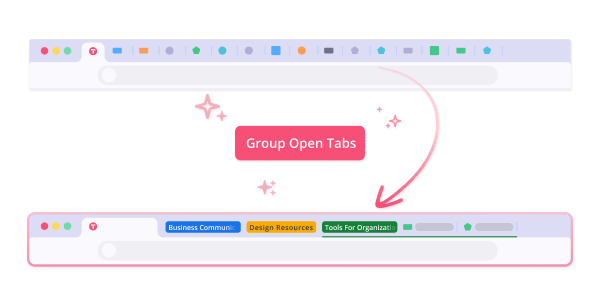
AI Grouping
No dragging, no guessing. Toby's AI groups your open tabs into smart, organized collections that make sense—so your browser feels lighter instantly.
How it works
Step 1: Make sure "Enable Tab Groups" is turned on: Head to your Account Settings in the bottom left corner and flip the switch.
Step 2: Click Group Open Tabs in the Toby sidebar.
Step 3: Watch your cluttered tabs transform into clean collections in seconds.
AI Naming
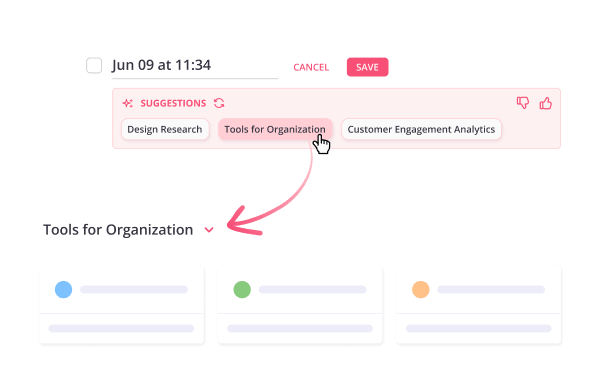
Skip the blank stares at “Untitled Collection.” Toby uses AI to suggest clear, relevant names for your collections, so you always know what's inside at a glance.
How it works
Step 1: Double-click the collection name to edit.
Step 2: Click Generate Suggestions.
Step 3: Select the name and save!
Step 4: Click the thumbs up or down to tell us how our AI did!
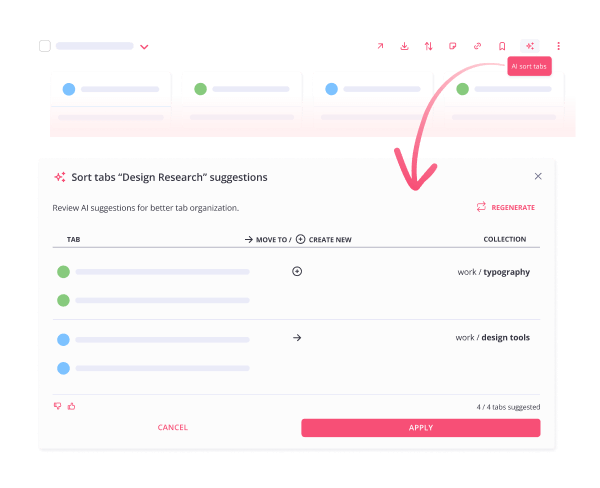
AI Sorting
Don't let past research or saved sessions turn into digital junk drawers. With one click, Toby's AI sorts and organizes your existing collections so they're just as easy to use as your new ones.
How it works
Step 1: Hover over the collection you want to sort.
Step 2: Look for the ✨ AI Sort Tabs icon on the right side.
Step 3: Click the icon.
Step 4: Review suggestions.
Step 5: Click Apply to sort your collection.