Meet Toby 2.0: A Better Way to Organize Your Tabs
Toby Team
September 12th, 2026
7 min read
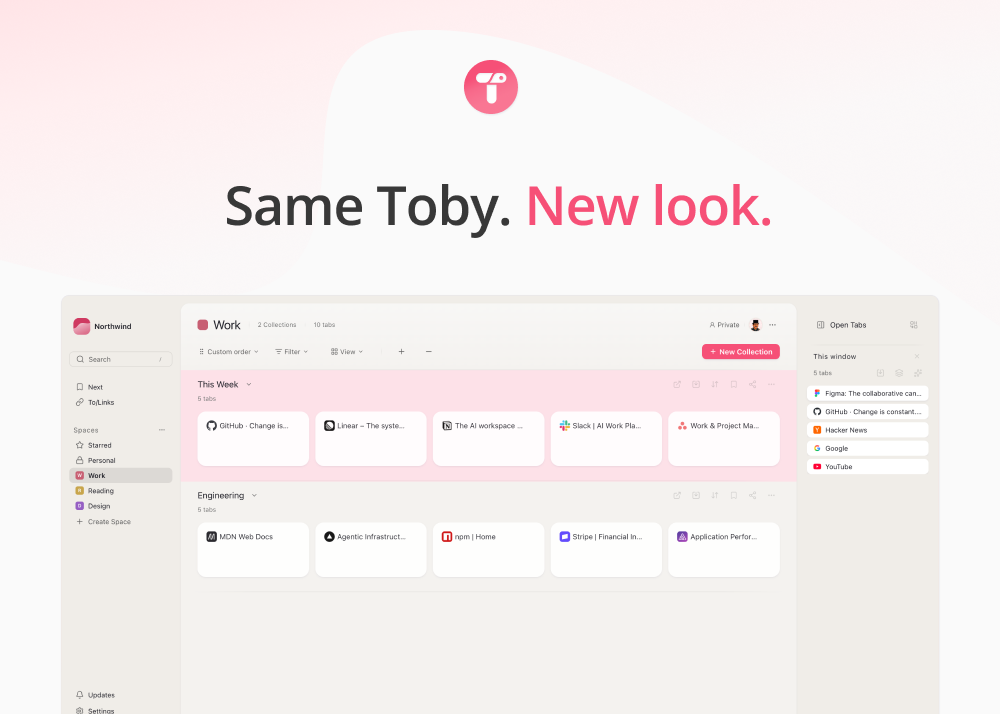
Toby helps you organize browser tabs into collections, so you can close the window without losing track of your work.
We’re introducing Toby 2.0, with smoother drag and drop, a new browser side panel, richer notes, and a refreshed design.
Ten years after we launched, the goal remains the same: make it easier to save your work and come back to it. This release builds on that promise, with improvements to the things you do every day.
Toby 2.0 is rolling out to Chrome users, expanding over the next few weeks. Your saved tabs, collections, and settings carry over automatically, with nothing to migrate or re-import.
What’s new in Toby 2.0

Smoother drag and drop for tabs and collections
Drag and drop is at the heart of Toby. In 2.0, we’ve rebuilt it so moving tabs and organizing collections feels smoother and more precise. Collections hold still while you carry a card over them. The surrounding cards move apart, and a single drop marker shows where your card will land. Change your mind? Press Escape to put everything back where it started.
It can also do a few things it couldn’t before:
- Drop a tab between two collections to start a new one.
- Drop one collection onto another to merge them.
- Tab groups keep their color when you save them into a collection and when you open them again.

Faster performance as your library grows
Whether you’re organizing a few projects or years of saved tabs, Toby 2.0 is built to stay responsive as your library grows. We test changes against libraries containing thousands of saved tabs, with particular attention to scrolling, dragging, and navigating larger collections.
When you rename, move, star, or delete an item, you see the change right away. If a change can’t be saved, Toby lets you know and puts things back the way they were.

Keep Toby beside the page you’re working on
The Toby toolbar button now opens a browser side panel that stays open as you switch between tabs. Drag the page you’re on into a collection, or check your Next list, while keeping the page in view.
The side panel is on by default. Prefer the popup? You can switch back from the panel itself or in Settings.

Workspaces, not organizations
Organizations are now called workspaces: the places where you keep your work, whether you’re organizing personal projects or sharing with a team.
A new workspace switcher replaces the rail of icons, bringing all your workspaces into one list and marking the ones on a paid plan. Each workspace still has its own subscription, and now you can see at a glance which ones are covered. And when a space is shared, the people who can see it appear in its top corner, so you never have to guess who has access.

Richer notes alongside your saved tabs
The updated notes editor gives you more ways to capture ideas, organize research, and keep track of next steps.
You can add headings, bold and italic text, links, quotes, bullets, numbered lists, checklists, and monospaced text for booking codes or snippets. Every format has a keyboard shortcut, and everything saves as you type.
Your existing notes stay exactly as they are, with the new tools available when you edit them.

A refreshed design that keeps your work in focus
Your new tab page is a space you return to throughout the day. Toby’s refreshed design keeps color and motion restrained, with your saved work at the center.
All nine themes are still here in light and dark modes, with updated colors. We’ve also added palettes designed for three types of color blindness.
Settings now live in one place, bringing together your profile, preferences, keyboard shortcuts, members, subscription, and import and export options.
A new foundation for the Toby you know
We rebuilt Toby around three priorities: a familiar experience, responsive performance as your library grows, and dependable access to your saved work.
The Toby you open tomorrow should feel like the one you opened yesterday, only faster, smoother, and more dependable.
When will you get Toby 2.0?
We’re starting with a small percentage of Chrome users and widening the rollout as we confirm everything is working the way it should. You don’t need to take any action. The update arrives automatically, and you’ll know it’s there when Toby’s Settings shows version 2.0.0.
Everything you’ve saved carries over: workspaces, collections, tabs, sessions, notes, tags, and settings. You won’t need to sign in again.
Toby Mini will follow once the full Chrome extension has reached everyone, with Firefox coming after that.
Questions or feedback? Contact our support team. We’d love to hear how the new experience is working for you.
Ten years of Toby
Toby has always been a small team, and we’re grateful that so many of you have made it part of your day. You’ve saved your work here, shared Toby with other people, and told us what would make it better. That feedback has helped shape this release.
Thank you for being here, whether you’ve been using Toby since 2016 or found us last week.
Ten years on, the promise is the same as it was on day one. Save it, close the window. Toby has it now.
New to Toby?
Get Toby for Chrome