Colour-Coded Collections!
Toby Team
November 24th, 2025
2 min read
A Simple Way to Feel More Organised Online: Why Colour Can Transform Your Workflow
They feel disorganised because today’s browser wasn’t built for the way they work.
At Toby, we see this every day. Even the most organised people end up with overflowing tabs, scattered bookmarks, and a browser that becomes harder to navigate as the day goes on.
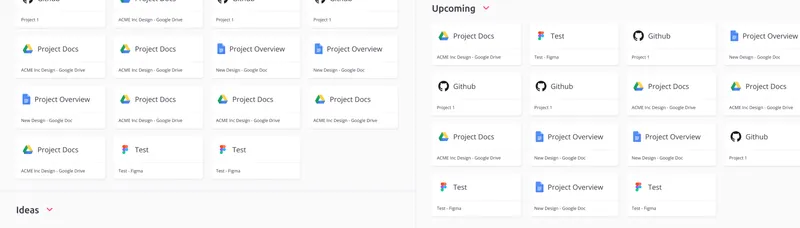
Important resources blend together, personal and work links compete for attention, and everything starts to feel heavier than it needs to.
How Toby Supports This Visual Approach to Organisation
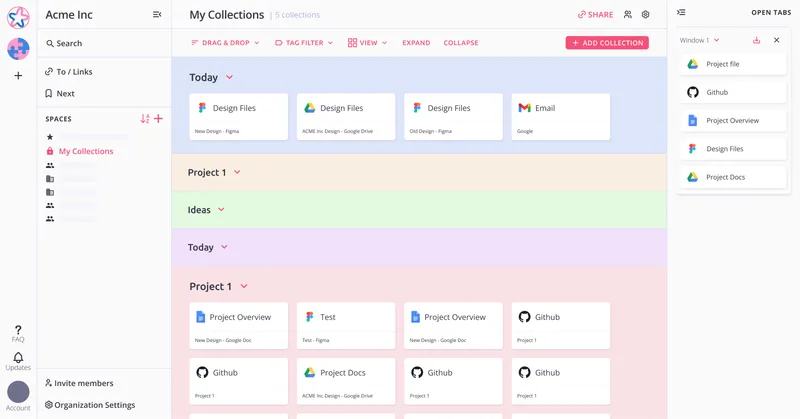
Toby already allows you to organize your resources in a much more visual way, but we’re thrilled to announce that in the effort to make this even simpler and easier, we now support Colour-Coding Collections.
You can assign a colour to any Collection, creating an instantly recognisable visual system that helps you save, organise, and retrieve your resources with ease.
It’s a simple but effective way to bring clarity back to your browser—and create a workflow that feels natural instead of chaotic.
Why Colour Helps You Feel More Organised
Colour is a powerful visual signal. It helps your brain:
- process information faster
- recognise categories instantly
- reduce cognitive load
- switch between tasks more comfortably
- recall saved content more reliably
Instead of scanning identical-looking folders or lists, colour lets your eyes guide you.
Practical Ways People Use Colour To Stay Organised
Separate work, personal life, and everything in between Give each area of your life a distinct colour.
Highlight what matters most Use stronger or brighter colours for high-priority work. Use softer tones for long-term or reference material.
Build a simple workflow using colour stages
- Many users colour-code by:
- planning
- in progress
- needs review
- done
It’s a lightweight, visual way to track projects without another project management board.
Keep research threads tidy and easy to revisit Whether you’re studying, comparing tools, or gathering resources, grouping by colour makes it easier to return to your research.
Reduce visual overwhelm Create a cleaner, more comfortable digital environment.
If you’re looking for a lighter, calmer, and more intuitive way to stay on top of your work, try adding colour to the way you organise your online world.
It’s one of the easiest changes you can make, and one of the most effective.